
-
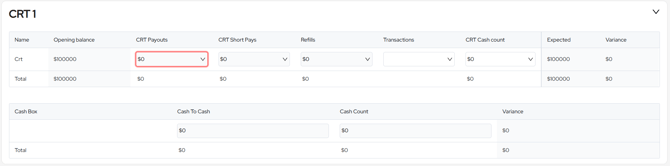
Opening Balance - The opening balance is the closing balance from the previous day.
-
CRT Payouts (required field) - Ticket to cash payouts through the CRT, these are entered by denomination.
-
CRT Payouts should match the ticket payouts recorded in your gaming system for the CRT
-
Can be entered by individual denomination totals, or a consolidated total can be entered in the 5c field if this is preferred
-
- CRT Short Pays - This section is used to record any short-paid amounts (funds that should have been dispensed but weren’t) from your CRT. These amounts will be deducted from the expected refill total.
- When expanded, you'll see two fields: CRT Payout Short Pays and Cash to Cash Short Pays. Use these to enter the corresponding short pay amounts as reported on your settlement report. The values will automatically be summed when the section is collapsed.
-
Refills - Cash used to refill the CRT. This amount is deducted from the bankable total.
-
Can be entered by individual denomination totals, or a consolidated total can be entered in the 5c field if this is preferred
-
-
Cash Count - The closing balance of your CRT for the day.
-
Expected – The Expected value is calculated as: Opening Balance − CRT Payouts − Cash Box + Refills.
-
Variance - Variance is calculated as: Expected − Cash Count. Any difference is posted to the Overs and Unders GL account.
Cash Box
The Cash Box refers to the Note-to-Note transactions cassette. It captures cash exchanged between denominations within the CRT.
-
Cash To Cash - The Cash Box Read is the expected cash value from the cassette clearance, as recorded by the CRT system.
-
Cash Count - Cash Count is the actual cash from the Cash To Cash cassette clearance.
-
Variance - The variance calculates expected - cash count and assigns any variance to the 'overs and unders' GL.