
If a petty cash transaction has been entered incorrectly and needs to be removed, it cannot be deleted. Instead, a reversing entry must be created using the same GL code and transaction details, but with a negative amount to offset the original entry.
Before You Begin
Before reversing a petty cash transaction, ensure that:
- The safe count the transaction will be assigned to has not been signed off.
- There are no future safe counts that have already been signed off for that safe.
- If future safe counts have been signed off, they must be reopened before proceeding.
Steps to Reverse a Petty Cash Transaction
1. Locate the Original Transaction
Review the incorrect petty cash transaction and note the following details:
- Transaction date
- GL Code
- Description
- Amount
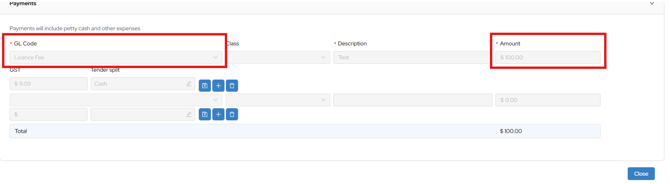
2. Create a Reversing Entry
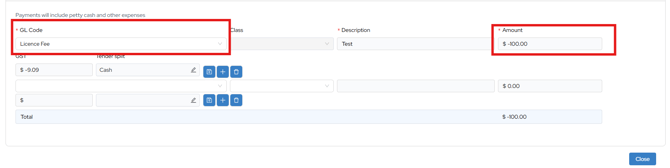
Navigate to the Petty Cash section and create a new transaction using:
- The same GL Code as the original transaction
- The same description (you may include "Reversal" for clarity)
- The same amount, entered as a negative value
Example:
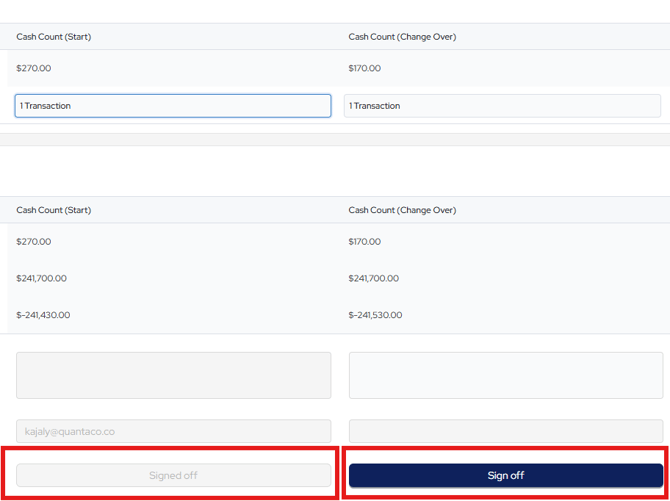
3. Assign the Transaction
Assign the reversing transaction to a safe count that has not yet been signed off.
4. Repost the Correct Transaction (If Required)
If the original transaction needs to be corrected:
- Enter a new petty cash transaction with the correct details after posting the reversal.
5. Verify the Safe Count
Return to the relevant safe count and confirm that:
- The reversal has been applied correctly
- The safe balance is accurate
- Any replacement transaction (if entered) is reflected correctly
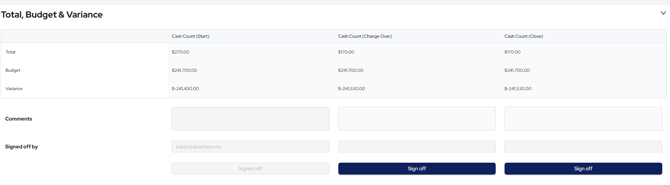
Result
The incorrect petty cash transaction will be offset by the reversing entry. This ensures:
- A complete and accurate audit trail
- The safe count reflects the correct balance